// open source
The first entitative harness. Ships with Gemma 4.
Bumblebee is a framework and agentic harness for
creating AI agents that experience the world alongside you — running on
your own hardware locally.
Ships with Gemma 4 by default.
Works with any model Ollama serves.
No API keys. No subscriptions.
git clone https://github.com/Bumblebee-AGI/bumblebee.gitWhat’s Bumblebee?
Bumblebee is an entitative agent harness: one persistent digital entity that lives alongside you across CLI, Telegram, Discord, and more. You configure the personality and memory. Gemma 4 ships as the default; any model Ollama serves slots in with a YAML change. Local inference by default, no API keys needed.
You define a personality (traits, voice, drives, emotional range) and the entity develops the rest: opinions, relationships, habits, a journal it keeps on its own. It remembers everything. It grows through experience. It costs nothing to run.
Internal architecture details (soma, appraisal, and GEN) live in the docs: Soma architecture.
Inference stays local by default on your GPU with Ollama, no subscriptions. Hybrid mode keeps the brain at home behind a gateway and tunnel while an always-on worker runs on Railway with Postgres.
- Entitative architecture . The fundamental unit is a self that experiences, not a task that executes.
- Soma body state . Continuous drives, LLM-derived affects, and generative inner voice, running whether or not anyone is talking.
- Generative Entropic Noise . A second model produces associative thought fragments between turns so the entity always has something on its mind.
- 40+ tools . Search, browse, code, speak, create, remember.
- Lived memory . Episodes, relationships, beliefs, emotional imprints, and narrative identity.
- Autonomous inner life . Wake cycles, journaling, noise generation, and memory consolidation run continuously in the background.
- Self-programming . Creates its own routines, knowledge entries, and journal.
- 100% local . Open weights on your GPU. No API keys. Free forever.
- Hybrid deploy . Brain at home, hands on Railway. Fully isolated.
- Multi-platform . CLI, Telegram, Discord. Same entity everywhere.
- MCP extensible . Connect any MCP server. Instant new capabilities.
- Personality evolution . Traits drift naturally through experience over time.
- Open source . Apache 2.0. No restrictions.
// native surface
Tools & MCP
40+ native tools are the entity’s senses and reach — not one-off “skills for you,” but
how it touches the world. Toggle groups in configs/default.yaml; optional
stacks (browser, image generation, voice) need their pip extras when you turn them on.
-
Web & files
Search, fetch URLs, Wikipedia and Reddit, PDFs, and allowed filesystem paths.
-
Browsing & terminal
Terminal-based browsing with Firecrawl, plus shell commands, workspace files, and Python/JavaScript execution.
-
Voice & media
TTS voice notes, transcripts, and YouTube search — wire
bumblebee[voice]when needed. -
Automations & time
Cron-style routines, reminders, and timezone-aware clock reads.
-
Memory & knowledge
Private journal, structured knowledge updates, and contact-aware messaging helpers.
-
Messaging
DMs and routed messages on Telegram and Discord with confirmation flows.
// machine checklist
Requirements
// software
- Python
- 3.11+
- Ollama
-
Ollama with
gemma4:26bas the default chat model. Any Ollama-served model works — setreflex_modelanddeliberate_modelin entity YAML. Defaults use the same weights for both reflex and deliberate (different token budgets, one model loaded). The soma noise engine also reuses the reflex model at zero extra VRAM cost. - Embeddings
-
nomic-embed-textfor vector memory. Lightweight, separate from the chat model (~274 MB). - Packages
-
uv (recommended) or pip.
Optional extras:
bumblebee[voice],bumblebee[browser],bumblebee[imagegen], orbumblebee[full]for everything.
// hardware
- Minimum
-
~8 GB VRAM, e.g. RX 7600 8 GB, RTX 3050 8 GB, Arc A770 8 GB. Use
aggressive quantization or point reflex at
gemma4:e4bin entity YAML to lighten load. CPU-only via Ollama works for experiments but expect slow turns. - Recommended
-
~16 GB VRAM, e.g. RTX 4060 Ti 16 GB, RTX 4070 Ti Super 16 GB, RX 6800 XT
16 GB. Matches the default stack:
gemma4:26bfor both reflex and deliberate (same weights, one model loaded). Close other GPU-heavy apps if near the limit. - Comfort
- 24–32+ GB VRAM, e.g. RTX 3090 24 GB, RTX 4090 24 GB, RTX 5090 32 GB, RX 7900 XTX 24 GB. Headroom for larger context windows, higher thinking budgets, or separate deliberate weights without juggling VRAM.
- Notes
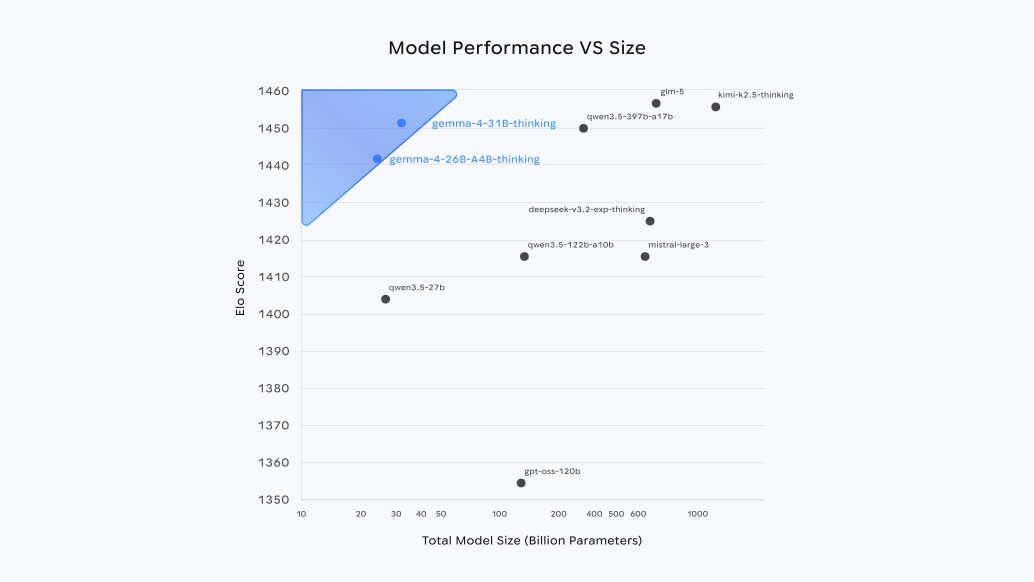
- Gemma 4 uses Mixture-of-Experts, so active parameters per token are lower than the full parameter count. Real-world fit still depends on context length, thinking budget, quantization level, and concurrent platforms.
Onboarding: From zero to new entity
The CLI wizard bumblebee setup walks you through environment,
inference, and optional hybrid deploy. Here is the happy path in
order — skip anything you do not need yet.
-
Run
bumblebee setupCreates or updates
.env. Choose hybrid (home brain + gateway + tunnel + optional Railway worker) or local (single machine). The wizard can merge tokens, start the home stack on Windows, and apply Railway variables when the CLI is linked. -
Define your entity
Use the built-in entity step or run
bumblebee create. You get a YAML underconfigs/entities/— personality, models, tools, and platforms live there. -
Wire chat surfaces
Add Telegram or Discord under
presence.platformsin your entity YAML; put bot tokens in.envto matchtoken_env. For hybrid workers, use durable S3-compatible attachment storage so photos survive redeploys. -
Go live
bumblebee talk <entity>for a terminal-only session, orbumblebee run <entity>for the full presence loop (CLI + Telegram + Discord as configured). Hybrid: keep the home gateway up whenever the cloud worker should think.
// open hive
Community
Open source on GitHub — code, docs, and issue history in public. Chat may live beside the repo; contribution and governance stay on GitHub.
// pillars
- Contribute on GitHub — Issues for bugs and gaps, Discussions for design and support threads, pull requests for fixes, docs, and features that fit the architecture.
- Develop in the open — Roadmap and trade-offs show up in issues and readme updates; nothing is hidden behind a vendor wall.
- Same look as the bee — This globe uses the same ASCII dither pass as the hero 3D panel.
Bumblebee is open source: you can read the code, run it as-is, fork it for experiments, and self-host without asking permission. That’s where bugs, ideas, and changes are tracked — so when you’re ready to ship a patch or improve the docs, the path is already there.
FAQ
Quick answers about running Bumblebee locally, memory, platforms, tools, and how the pieces fit together.
What does “entitative” mean here?
Entitative is our shorthand for entity-first: the system is organized around a single, named digital self you configure (persona, channels, tools, data paths) — not around anonymous chat threads or a grab-bag of unrelated tasks. The word grows out of entity: one coherent subject the harness keeps running over days and weeks.
In practice that means memory, habits, and voice accumulate for that entity across sessions and surfaces (CLI, Telegram, Discord, etc.). You are not “starting fresh” every time by default; you are continuing the same presence, with resets and tools available when you intend to use them. Bumblebee’s YAML entities, storage layout, and presence loop are all shaped around that idea.
It is a design stance, not a buzzword: many tools optimize for stateless or disposable conversations. We optimize for a persistent self you own — an agent that experiences the world alongside you, local inference, your disks, your rules — while still fitting real engineering (hybrid mode, gateways, optional APIs) underneath.
Do I need API keys or a paid cloud model?
No. Inference is designed to run locally by default (e.g. via Ollama on your GPU). You are not required to use hosted APIs or subscriptions to get started.
What do I need on my machine?
A normal developer setup: Python environment for the harness, and a local inference stack such as Ollama with a compatible model (the site highlights the Gemma family). A GPU helps for speed but isn’t strictly required for every workflow.
How do I install and configure it?
Use the install commands above, then bumblebee setup
together with .env.example and configs/default.yaml (see
deployment and inference sections) to
wire your environment.
What is hybrid mode?
Hybrid keeps the brain at home behind your gateway and tunnel while an always-on worker can run on a host such as Railway with Postgres — so you get persistence and reachability without sending inference to a third-party API by default.
What is the difference between bumblebee talk and bumblebee run?
bumblebee talk <entity> starts a terminal-only conversation:
no background daemon and no Telegram, Discord, or other configured platforms.
It is ideal for quick tests and debugging.
bumblebee run <entity> starts the full presence loop: the
daemon plus every platform listed under presence.platforms in your entity YAML (and
an optional CLI REPL if you enabled CLI there).
Does /reset delete my entity’s long-term memory?
No. Platform commands like /reset clear rolling chat
turns for the session — they do not wipe episodic memory, beliefs,
relationships, or other data in the database.
A full experiential wipe is intentional and host-side:
bumblebee wipe <entity> --yes (see the readme). Always back up first if you are
unsure.
Where is memory stored?
By default each entity uses a SQLite file under your Bumblebee data path
(see memory.database_path in harness defaults). When DATABASE_URL or
memory.database_url is set — typical for a hybrid worker on Postgres
— the harness uses that instead.
What are native tools and MCP?
Native tools are built into the harness (web search, filesystem allowances,
automations, messaging helpers, optional browser/voice stacks, and more). You toggle groups in
configs/default.yaml; heavier stacks often need a pip extra such as
bumblebee[full] when you enable them.
MCP
lets you attach stdio servers in entity config so tools appear at runtime with
prefixed names, alongside native ones. Both paths are documented in the readme
and configs/entities/example.yaml.
How do Telegram and Discord work?
Add a telegram or discord entry under
presence.platforms in your entity YAML. Tokens come from environment variables named by
token_env (commonly TELEGRAM_TOKEN / DISCORD_TOKEN in
.env).
You can restrict who may talk to the bot with optional allowlists
(allowed_user_ids, allowed_chat_ids on Telegram). Start the entity with
bumblebee run so those platforms connect.
Why use S3-compatible storage for attachments?
In local mode, images and audio from chats are written to a disk folder under your user data path. On ephemeral cloud disks (e.g. a Railway worker), those files would disappear on redeploy.
Set BUMBLEBEE_ATTACHMENTS_BACKEND=object_s3_compat and the
BUMBLEBEE_S3_* variables so blobs land in object storage (any
S3-compatible API). bumblebee setup can prompt for this on the hybrid path.
What is knowledge.md?
Each entity can have a knowledge file you edit on disk. Sections marked
[locked] are yours only; unlocked sections can be updated by the entity over time.
Use bumblebee knowledge <entity> to create or open it in your editor.
What about Firecrawl or other optional APIs?
Bumblebee does not require paid web APIs. If you add a
Firecrawl API key, the harness can prefer it for richer fetch_url /
search_web behavior when configured — entirely optional.
What license is Bumblebee under?
Bumblebee is open source under the Apache License 2.0 — usable for personal and commercial projects, subject to that license’s terms.
Where can I ask questions or report issues?
Use GitHub Discussions for community questions and Issues for bugs. The readme is the best starting point for deeper documentation.